1.1 Introduction:
Different applications may sometimes need to "communicate" with each other, or exchange information.Such applications may live on the same "machine", or they may be installed on different machines.
It's quite typical of (higer level) applications that they focus on certain functional tasks, or exhibit all sorts
of business functionality. They themselves, are often not involved in interfacing and lower level protocols.
Suppose two applications are indeed on different machines. If they need to exchange information,
then it is obvious that those applications ultimately need to use the services of the transport/network modules, which
are already installed on those machines, just to get the data "on the wire". Ofcourse, all typical network related issues like
addressing, assembling segments, error correction, media-acces etc... is taken care of by such a "network-stack".
So, the the bottom layers are handled then, by the network stack.
However, maybe App1 on Machine1, wants to activate, or call, a certain procedure of App2 on Machine2.
This procedure of App2, may for instance perform a very specific task, which only that procedure can
perform on Machine2.
A solution might be that App1 uses a "proxy", or a stub, which is a library or repository of all callable functions
of App2, but not the full code itself. Then, when needed, App1 selects the function to call, and the local stub
wraps it up and passes it to the local transport/network layer in order that it will reach App2 on the other machine.
Or as another scenario, maybe App1 and App2 need to pass along messages of data, or a temporary stream of data,
and a mechanism is in place that it just "looks" as if they simply perform Filesystem IO, while in reality
this IPC mechanism (like a named pipe) wraps it, and passes it to the transport/network layer.
This "middleware" between the Application and Transport/networks stack, is often called
an "Inter Process Communication" (IPC) protocol or mechanism.
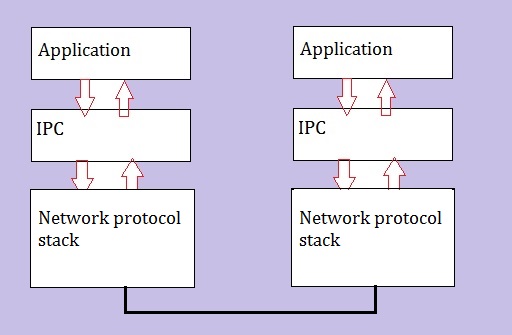
A very high-level picture of this can be seen in figure 1 below:
Figure 1: High-level overview "Application-IPC-Network" stack.
Applications (or distributed modules of those app's) may communicate using a variety of IPC's.
Some well-known IPC's are "RPC", "shared memory", "named pipes", "sockets", and a couple more of such IPC's.
Java applications may use specific IPC's in the Java architecture, like RMI (Remote Method Invokation),
which is quite similar to RPC.
See chapter 3 for Java specifics.
For communication between applications, in principle, only one IPC mechanism should suffice.
But for various functions, it's possible that other IPC mechanisms are "called in" too.
Each IPC method has its own specific advantages and certain limitations, so it is not unusual for a single application
to use multiple IPC methods.
Figure 2: Hopefully, a "Reasonable" picture showing some main IPC's, with respect to possible dependencies:
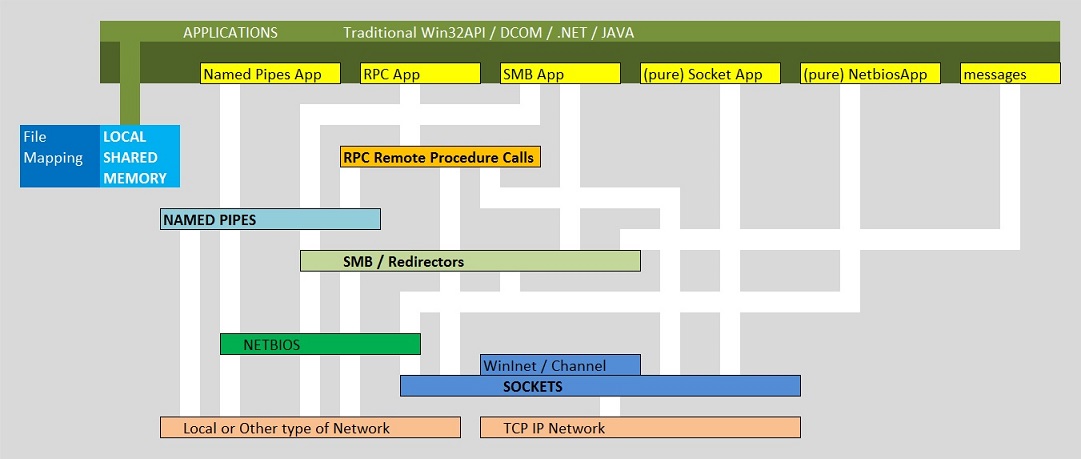
By the way, no picture showing IPC's, can be perfect: it will never make everybody happy.
One cause of this might be, if one uses a top-down perspective, and is very strickt on the relative
positions of IPC's. However, the picture above only tries to show which mechanism might depend (or use) functions
of other mechanisms.
-Remember that, in principle, an Application should use one IPC method to communicate with another remote Application.
-However, sometimes, for various functions, often multiple IPC's are selected.
-And it is also true that a certain IPC, may use the exposed "methods" of another IPC, for certain functionality.
You may also wonder how providers/libraries as ODBC and OLEDB etc.. would fit in such a picture as shown in figure 2.
These providers are pretty much "high-level", and the appendices will show some common examples.
Maybe it's not a bad idea to discuss a few of those IPC's.
1.2. Named Pipes:
This one is often used in situations where two processes are on different machines.The "conceptual" idea is easy to visualize: picture a client process and a serverprocess.
Next, visualize a "tube" between those processes, which they use to exchange information.
Ofcourse, the above is a bit too simply put. However, the protocol stems from a long time back, and
two "modes" of usage could be distinguished: "byte mode" and "message mode".
Especially the "byte mode" gives you a sort of feel for a "pipeline" where bytes are streamed from the one process
to the other (ofcourse, with buffering when needed).
It really looks like a unix pipe, where the output from one program is fed into a second program.
Pipes or "named pipes" (if they really have a identifier as a "name"), absolutely looks like filesystem IO.
In fact, when a pipe is instantiated, a "handle" is declared and bound to the pipe.
As you might know, "handles" are the mechanism by which a file is accessed.
Further, when the pipe is used, we actually have functions as "ReadFile()" and "WriteFile()" active, in order
to send and receive data.
You might see it as an (OSI) session layer protocol (layer 5), and it just uses the services of an underlying network protocol.
Yes indeed. Named pipes can just float on almost any networkprotocol.
In Microsoft systems, it is a fact the it may use modules of the "redirector" services in the Operating System, which
enhances the view that it simply resembles filesystem IO.
You can also see that in the "named pipe" identifier, which is an UNC path like "\\Servername\PIPE\MyPipe",
or, if you have some server process on your system which uses named pipes, you can find a name like "\\.\pipe\pipename"
on your system, for example in the Registry (note: "\\." is a synonym for the local system).
1.3. Shared Memory:
Some applications use "shared memory" for exchange of information.It is true that some architects and developers do not view it as a true IPC mechanism.
A characteristic however, is that the applications reside on the same system and Operating system.
While other IPC's more often use networks or remote communications, the "shared memory" works local.
I immediately haste myself to say that indeed "distributed" memories across systems do exist.
But in the mainstream of commodity applications, the use of shared memory is a local business (local to the machine).
A good example are the typical Database engines. At startup, such an engine reserves an area of shared memory,
and all sorts of background processes (belonging to that Database engine), and server processes can access parts
of the shared memory. This way, exchange of information can be realized (e.g. rows of some table).
The systemcall interface (or API) of the OS, usually provides functions to reserve and release "shared memory".
Typically, once in place, the processes can read and write in those memory segments without calling operating system functions.
This is neccessary, while otherwise "access violations" by the OS would be signalled al the time.
Ofcourse some sort of synchronization mechanism must be in place, otherwise the whole thing becomes a "zoo",
and strange things will happen.
Often (but not exclusively) "mutexes" will handle the synchronizations.
It's short for "mutual exclusion" object. A mutex is a program object that allows multiple program threads to share
the same resource, but not simultaneously.
Other "signals" (or flags) that are used to "signal" that some resource is in use, are "semaphores",
and "latches" (whereby the latter is a general term for locks on resource objects).
1.4. TCP Sockets:
I like to distinguish only 2 (on what I think) are really different ones, namely"domain sockets" and "network sockets".
Domain socket:
A "domain socket" is an IPC method by which processes, usually on the same host, can communicate.
Such a socket again looks like a sort of filesystem IO, and is known by a pathname.
So, a "pipe" and a domain socket on a unix/linux system, have quite a few similarities tin common.
Network socket:
A "network socket" is relatively easy to understand. A service, addressable or reachable by a network socket,
is then identified by an IP address and port.
These sockets can be used with local- and remote communications.
When talking about IPC in networks, usually, folks mean TCP- or "network sockets".
So, here I only like to say a few words on network-, or TCP sockets.
Figure 3:
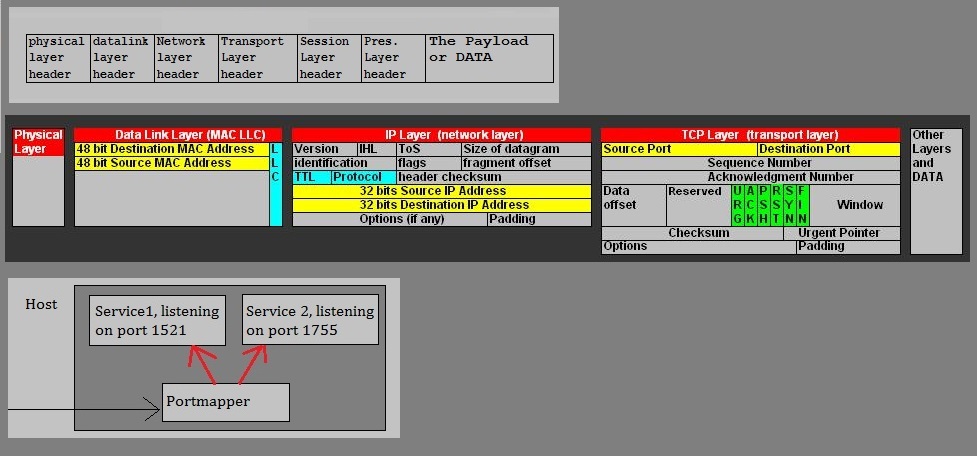
The figure above, shows three parts. Please take notic of the middle picture.
Here we see the IP header and TCP header of an IP packet in a Local Aera Network.
The IP header is mainly occupied with "addressing" business (source- and destination IP address).
Now look at the TCP header. Here we see the source- and destination ports as fields in that header.
You may have identified a machine in the network by it's address, but what if multiple "server" services
are running on that machine. How to identify such service? It's done by it's "port". And in the figure,
it would then be the "destination port" (like for example 1521).
In fact, the string "IP address:Port" completely identifies a service on a remote machine.
For example, we could have the string "202.100.100.43:1521", which identifies a service on the machine
using the IP address 202.100.100.43, where that service "listens" for connections to port "1521".
Usually, server services use fixed ports (where they listen on), like for example 1521.
The clients of those server services, often use dynamically choosen ports, as long as such port
is not already occupied by some other client process (on some specific client machine).
A string as "IP address:Port", is often called a "network socket". Such sockets functions as
the connection points between client- and server processes (usually on different machines).
On the server machine, a generically named process "the portmapper", will dispatch the recieved TCP segments,
to the services which are listening on their own port.
On some Operating systems (some unixes), such a process is indeed named (like something that looks) like "portmapper".
But on most other platforms, you do not see something like that in a process listing.
1.5. Remote Procedure Call or RPC:
If you work with Windows, I can tell you that it "a lot of it, runs completely on RPC.If RPC is used between modules within the same Operating System (machine), then RPC is often renamed to LPC.
LPC is short for "Local Procedure Call".
We will treat RPC here in it's usual context, that is, a program (module, object...) on a certain machine,
want to have a remote program (that is, on another machine), to execute a "procedure".
By the way, since "object oriented programming" (OOP) is practically done everywhere nowadays, such procedures are
often called "methods" which we can associate with a (program) "object".
If a developer creates a OOP "object", he/she also writes code like "member functions", which are defined within that object.
Usually, public and private methods are written, where the public ones can be "called" by an external entity (like another object).
So, suppose we have App1 on Machine1, and App2 on Machine2. A number of important questions immediately arises:
-How does App1 "knows" which methods it can "call" from App2?
-Secondly, how does App2 knows that it must execute that specific method (on request of App1)?
This is all covered by the RPC protocol.
Certain implementations uses a sort of "table" of pointers, which describes how methods can be "called". Sometimes his is called
the "vtable" approach.
It can also be a part of the "Interface Definition" (IDL), which makes it possible how App1 knows how to call "what" on App2.
Let's first study the figure below:
Figure 4:
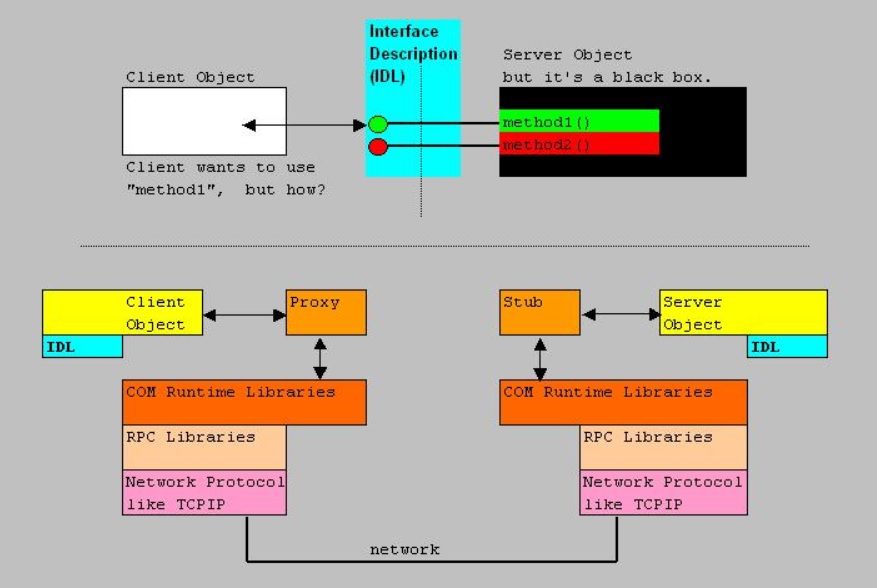
Let's suppose that an IDL, or a sort of vtable, provides App1 with the knowledge what function calls (method calls)
it can ask of App2.
Then App1 selects the correct pointer, the Proxy/Stub marshalles it to the correct format, and wraps it up to a format
which the underlying IPC mechanism can understand, and the stream is handed over to for example the "sockets" interface.
From then on, the usual and regular network technology jumps in. At the server side, the Proxy/Stub acts like a local client,
and the member function is executed by App2.
Note: figure 4 was created with (D)COM applications in mind, which primarily uses RPC as a common IPC.
1.6. Message passing:
There may exist different perceptions on this.However, the usual "Message Exchange" interpretation, is, generally, not the same as "Message Passing".
But I must say that the boundary is not always very clear, and indeed, sometime "Exchange" works like "Passing".
I think that I can make this clear...
- Message exchange:
For example, here you may think of transmitting pure XML data, in a SOAP envelope, using http, to a receiver,
where that XML data is parsed and further interpreted. Maybe that XML data was nothing more than a request
to place an order, or a request for stock information, or data that must be stored at the receiver etc..
As another example, you might also think of some MQ (Message Queuing) service, where transmit- and receive queue's
exist at both the sender and receiver, and data messages get transferred when needed.
When the receiver is temporarily unavailble, the messages will stay in the queue, until they can be processed.
- Message Passing:
This is really an IPC mechanism. Most Operating Systems and applications make use of it.
I think that (generally) three main types exist, but we must not view this division to be very "hard":
1. "Events" and nummeric identifiers on/in the same Operating System, and Applications.
In Windows applications, it is heavily used, especially in graphical applications (thus practically all).
In the Windows example, a "message" is simply a numeric code that uniquely corresponds to a particular event.
A mouseclick to minimize a Window, will make that the Operating System sends the corresponding "code" (e.g. for WM_LBUTTONDOWN)
to that particular Window.
So, Message Passing in "Event-driven" applications (on the same system) is very common.
Especially traditional programmers on the Win32 API, can probably just list many of them without consulting any documentation.
2. Calling "methods" (functions) of local or remote objects.
You might say that this looks like "RPC". Yes, but generally, the request is encapsulated in a "message".
So, for example, while it seems completely natural that SOAP on HTTP is used for transmitting data,
it can also be used to request a remote service to execute a procedure.
If the infrastructure at the receiver allows it (like that "endpoints" are defined), the content of the request
in that message will simply lead to the fact that the procedure is executed.
3. MPI Interface.
The message passing interface (MPI) of "C" and some other languages, and some "shells", makes it possible that
send() and receive() functions can be used, with the objective to activate code on a local or even remote object.
The "formal" MPI specification, is quite an elaborate framework.
I think that the descriptions as listed in (1) and (2), are the most common Message Passing models.
In specific situations, or when one likes, or one must use C (and comparable development platforms), or
the infrastructure simply demands it, then (3) is used.
For (2) and (3), often TCP sockets are used as the lower level IPC.
So, I guess that this is about it, for what I like to say on some standard IPC mechanisms.
Next, we explore a rather explicit but elaborate model (SOA), and thereafter, we go for "Java".
Chapter 2. A quick look on "Service Oriented Architectures":
2.1. Introduction:
Suppose you are in a datacenter of some organisation, where a number of legacy systems
still have a prominent position, but that organisation also uses a mix of modern systems too.
Chances are, that there were all sorts of proprierty interfaces developed, proving for all sorts
of data exchange between those systems.
Many of such interfaces, will then have there own proprierty formatting and implementation,
and maintenance is likely to be difficult and time consuming.
The situation sketched above, could be a candidate for a SOA restructuring of those systems.
SOA uses (as much as possible) a standardized message format and exchange between systems.
Often, "connectors and interfaces" are used as needed to "tap" into the legacy systems,
while those interfaces are (usually) also connected to a Hub, or Bus, with routing functionality.
"Webservices" are those technological components which are indeed the "glue" to make that possible,
where those components adhere (as much as possible) to a set of standards.
Here, we see that SOA leads to a high level op "Application Integration".
Figure 5: Rather exagerated view going from a forrest of Apps to SOA.
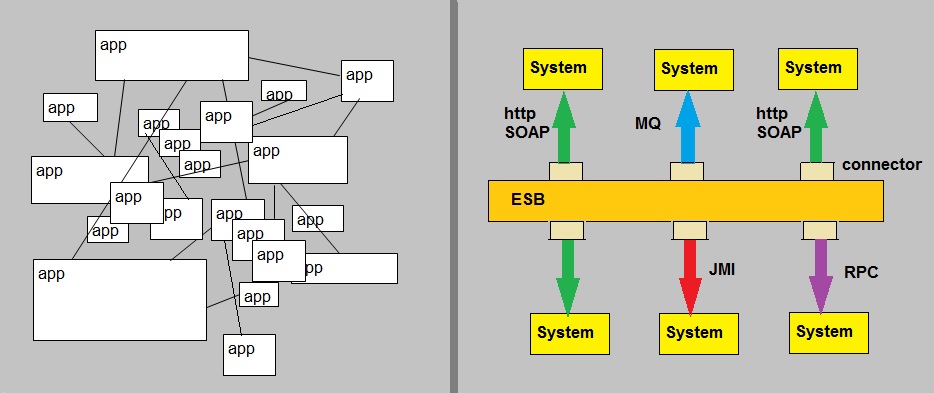
Ofcourse, the picture above is way from reality, except from some rare cases.
However, it should illustrate the main "target" of a SOA restructuring of IT business.
In a very succesful variant, business processes and modeling are really leading, and can with relative
low effort be translated to technical components for the actual implementation.
Often it is an XML-based workflow definition language in some "package", that allows businesses
to describe inter- or intra enterprise business processes, that are connected via Webservices.
Since XML data is usually a primary component of a SOA infrastructure, very large IO and processing/batches etc..
are no good candidates for a SOA conversion.
"Service Oriented Architectures" or "SOA", is an architecture (and also an understanding),
using a set of internet based technologies, architectured in such way, so that for
the components it generally holds that:
-have published contracts/interfaces,
-their delevopment is generally driven by Business processes,
-should be (in a high degree) Platform Independent,
-are Language Independent,
-should be (in a high degree) Operating System independent,
-should be "reusable" components,
-on a higher level, message passing is the prominent protocol,
-often operate in heterogeneous systems,
-often those heterogeneous systems are coupled through a message passing/routing Bus or Hub,
-use a "Registry" or repository, but preferably use some sort of dynamic discovery,
-often (generally) are loosly coupled (but that is not a very "hard" requirement).
Most of the above, applies to a software entity called "service", or more often, a "webservice".
Some keywords that are related to the technical implementations, then would be:
XML, SOAP (or REST), HTTP, WSDL, UDDI and probably an ESB (Enterprise Service Bus).
For about such a "Bus", it could well be a pretty "heavy" IBM Websphere, or Oracle Application Server
implementation, since such Application Servers can provide for a very "wide" infrastructure.
Where is the IPC? Well, SOA is certainly about communications between systems, but on a higher level.
For example, through message exchange of XML data using SOAP (or SOAP equivalent) envelopes via http.
Since it is heavily based on standards that came up with Internet technologies, we quickly think as TCP sockets
as to be the lowerlevel IPC. However, on a higher level, message exchange and message passing
are prominent IPC's in SOA. This is not to say that other IPC's are excluded.
We have Interprocess Communication on various levels. For a good understanding the typical messaging in SOA
needs to be described. I will try to do so.
2.2. High level message exchange:
1. XML
The datacontainer of a "message", is an XML document. This is a flat (ascii) file, starting with a declaration,
and next are lines starting and ending with "tags" which can be interpreted as data elements.
Here, unlike HTML, the tags do not say how data must be presented, but instead, how it must be interpreted.
A collection of "root" and "child" elements, sort of specify something that really looks like a record.
For example:
<customer>
<custID>428864</custID>
<name>John</name>
<order>117</order>
</customer>
Once the sender and receiver are aware of the "meaning" of the tags (like <custID></custID>),
that is, there exists agreement on the interpretation of the data, then usefull data exchange can take place.
Ofcourse, there is much more to say on XML, but that's not my goal here.
2. SOAP
SOAP (Simple Object Access Protocol) is a protocol used to "envelope" XML data, which resulting format then is
compliant to be send to a destination, using a high-level (IPC) protocol as "http" or "smtp".
This is no different than we already know from using the Internet, like accessing pages, downloading data etc..
So, indeed, a high-level application protocol as http is used to send- and recieve information.
Ofcourse, we know that http is an Internet standard, so the lower-level IPC protocol is sockets.
If you say that SOAP is good for "pure" data transmission, or "message exchange", then you are right.
However...., there is a second "way" where SOAP can be used.
SOAP can be viewed as the real-world successor of "XML-RPC", and that name probably rings a bell.
Indeed, SOAP can also be used for "message passing" which most folks interpret as accessing methods of remote objects,
or in simpler words, activating remote functions/procedures. This way, you can view it as the "Internet-way" of doing "RPC".
Or in the SOA context: SOAP can also be used to activate code on remote systems.
There are many ways how such XML-RPC could be implemented, but using SOAP/HTTP "end-points" is at least one "older" way to do that.
Here is an example for creating such endpoint in a database:
CREATE ENDPOINT SQLEP_test
STATE = STARTED
AS HTTP
(
PATH = '/EP_test',
AUTHENTICATION = (INTEGRATED),
PORTS = (CLEAR),
SITE = 'starboss.antapex.nl'
)
FOR SOAP
(
WEBMETHOD 'CustomerList'
(NAME='SALESDB.dbo.stp_ShowCustomers'),
WEBMETHOD 'InventoryList'
(NAME='SALESDB.dbo.stp_ShowInventory'),
BATCHES = DISABLED,
WSDL = DEFAULT,
DATABASE = 'SALESDB',
NAMESPACE = 'http://starboss.antapex.nl/test/showitems'
)
Note how also "real" methods (or stored procedures) are listed, like "stp_ShowCustomers", which can be called remotely, using SOAP.
The "key point" here, is that your webservice (the object with data and procedures) can be addressed using SOAP/HTTP.
See also section 1.6.
As a third way where SOAP is implemented, are UDDI SOAP requests and UDDI SOAP responses.
For that, please take a look below.
3. UDDI
Note how in the former subsection, we saw that through SOAP/HTTP, a procedure of a webservice could be accessed.
But how does a client service, "find" webservices, and their (exposed) methods?
You see it almost throughout all of IT. Often, there exists a (dynamical?) Repository, storing "mappings".
For example, the well-known DNS: it stores "friendly" names, and maps it to IP addresses.
Many other examples exist, like Active Directory. Such services acts like the "yellow pages" of a network.
When dealing with SOA and Web services, UDDI (Universal Description, Discovery and Integration) takes the role
of being a standard of registering webservices.
Figure 6: UDDI as a registering "repository or registry", for webservices.
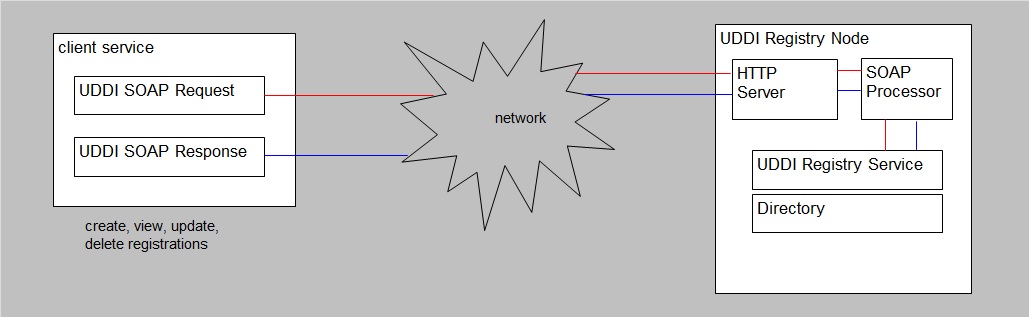
Ariba, IBM, and Microsoft developed the first version of UDDI. As the name suggests, UDDI allows a webservice
to register the services it offers, and to discover and interact with other services on the Web.
At the heart of UDDI is the UDDI Business Registry, an implementation of the UDDI specification.
With the registry, a business can easily publish services it offers, and discover what services other businesses offer.
The registry is created as a group of multiple operator sites. Although each operator site is managed separately,
information contained within each registry is synchronized across all nodes.
Again, UDDI looks a lot like the familiar DNS, but this time for webservices and the "services" it may provide.
When you use a certain developing framework, you might use a SDK, or class libraries, or other "stuff",
that will provide for the neccessary UDDI interactions (maybe even "under the hood").
So, when a certain Service goes "live", the registering process might look like as shown in figure 6.
For registering and retrieving information, it uses the "UDDI SOAP requests" and "UDDI SOAP response" messages.
4. WSDL:
UDDI stores the published interfaces of the webservices, or the "published contracts/interfaces".
Now..., as the last step, we only need the "document" that indeed describes the methods of a webservice,
so that this document can be send to a UDDI service, and can also be obtained from UDDI.
For exactly that purpose, we have the WSDL document (or message).
WSDL stands for "Web Services Description Language". So, actually the name already tells you all.
Although WSDL can do more than is listed here, in essence, it specifies what operations are avaliable
in the webservice.
The WSDL document also defines the methods, parameter names, parameter data types, and return data types,
for the Web service. An application that uses a Web service relies on the Web service's WSDL document
to access the Web service's features.
In general, a WSDL can be rather lengthy, and rather complex. But sometimes the developing framework, supports
generating the correct WSDL.
Example of a few lines in a WSDL message:
<message name="GetLastTradePriceInput">
<part name="body" element="xsd1:TradePriceRequest"/>
</message>
We have seen some specific features in some common protocols in SOA, like SOAP, UDDI, WSDL,
which enables a high-level message exchange and passing, registering of services, and calling
methods of webservices.
Let's go to chapter 3: Java.
Chapter 3. Java applications and Interprocess communication:
Ofcourse, I will not discuss "the whole" of Java here. It's practically impossible to put that in a simple note.
It litterally takes a whole library to discuss Java and the architecture, and all of it's offsprings.
Here, I will simply spend a few words, or zoom in, on IPC, but it cannot be avoided that some of the architecture must
be discussed as well.
Why Java, and not another architecture...? Well why not?
It's true that one can discuss DOT NET as well, or OS systemcalls, or go into DCOM or something, or some other platforms.
I think that chapter 1, covers the very basics of IPC's, for a lot of platforms. I really do.
But, Java has a few "specific" IPC implementations that cannot be left out in a general note on IPC.
I am not particular fond of Java, or DOT NET, or something. They all are pretty good, but at the same time,
all of them have a "few nasty things" as well. But that is not the point here.
So let's study some Java, with a special interest to "communications".
3.1. What is the JVM and the JRE?:
Appendices:
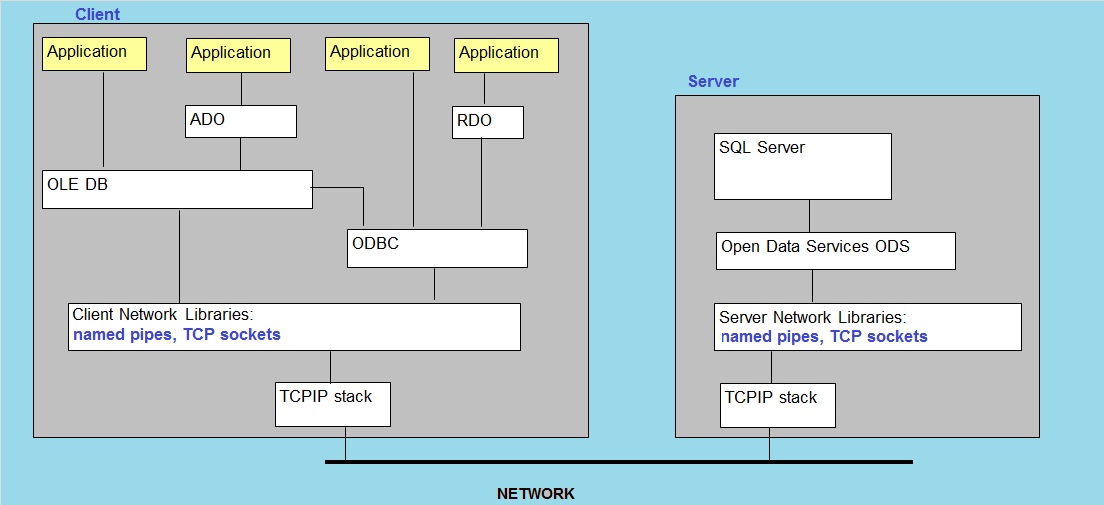
1. Traditional SQL Server "Client/Server" Connection model:
IPC and the traditional SQL client connectivity.
It litterally takes a whole library to discuss Java and the architecture, and all of it's offsprings.
Here, I will simply spend a few words, or zoom in, on IPC, but it cannot be avoided that some of the architecture must
be discussed as well.
Why Java, and not another architecture...? Well why not?
It's true that one can discuss DOT NET as well, or OS systemcalls, or go into DCOM or something, or some other platforms.
I think that chapter 1, covers the very basics of IPC's, for a lot of platforms. I really do.
But, Java has a few "specific" IPC implementations that cannot be left out in a general note on IPC.
I am not particular fond of Java, or DOT NET, or something. They all are pretty good, but at the same time,
all of them have a "few nasty things" as well. But that is not the point here.
So let's study some Java, with a special interest to "communications".